Put your usage on a README, a forum or your site

A published profile can travel. Every public profile gets a set of cards you can paste into a GitHub README, a forum signature or your own site, and the numbers on them are the same ones your profile shows.
The quickest way in is Settings, Cards and embeds: pick a card, pick where it is going, and copy the snippet. This page is the reference behind that panel.
Before you start
- The profile has to be public. Cards read the published profile and nothing else. A private profile gets a card that says it is private, never numbers. See publish a profile, or stay private.
- Every snippet uses your embed id, a 16-character code shown in the settings panel. It is derived from your account, not your handle, so a card you paste today still works after you rename. The id is a one-way hash: it does not reveal your account id, and it is not a password, since anyone can read it off a README.
- Free shows the last 30 days, paid plans the last 12 months, exactly as the profile page does. A card never shows a number the profile does not.
The cards
All of these are sample renders with made-up numbers.
Stats is the headline: the API list value, total tokens, active days, top model, and the last 30 days as small bars. 495 by 195, the same size as the usual GitHub stat cards, so two sit side by side.
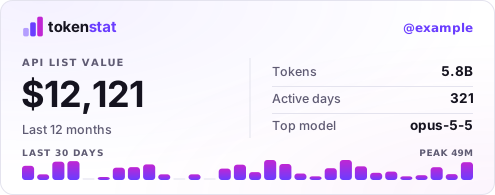
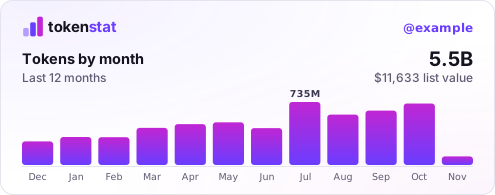
Chart draws tokens month by month for the last 12 months, or day by day on Free. Add ?metric=value to chart the API list value instead.
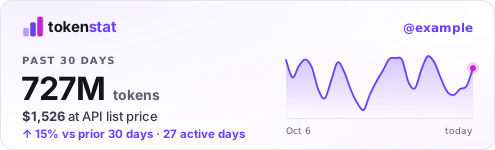
30 days is the recent picture: tokens and value over the past 30 days, the change against the 30 days before, and a trend line.
Badge is shields-sized, so it lines up with build and version badges. ?metric= picks the number: tokens (the default), value, days, or 30d.


Banner is the classic 468 by 60 forum banner, and userbar the 350 by 19 signature strip, scanlines and all.


Addresses and options
Replace YOUR_ID with the id from settings.
| What | Address |
|---|---|
| A card as SVG | https://tokenstat.ai/c/YOUR_ID/stats.svg |
| The same card as PNG | https://tokenstat.ai/c/YOUR_ID/stats.png |
| Your profile, by id | https://tokenstat.ai/c/YOUR_ID |
| The raw numbers | https://tokenstat.ai/c/YOUR_ID.json |
Card names are stats, chart, pulse (the 30-day card), badge, banner and userbar.
?theme=autois the SVG default and follows the reader's light or dark setting.lightanddarkpin one.- PNG has no auto, because an image file cannot ask the reader. It defaults to dark. Add
?theme=lightfor a light one. ?metric=works on the chart (tokens,value) and the badge (tokens,value,days,30d).
The /c/YOUR_ID address always redirects to your current handle, which is why every snippet links there instead of to tokenstat.ai/yourname.
GitHub README
GitHub shows an image in the reader's theme if you give it both. This is the snippet the settings panel produces:
<a href="https://tokenstat.ai/c/YOUR_ID">
  <picture>
    <source media="(prefers-color-scheme: dark)" srcset="https://tokenstat.ai/c/YOUR_ID/stats.svg?theme=dark">
    <img alt="tokenstat usage" src="https://tokenstat.ai/c/YOUR_ID/stats.svg?theme=light">
  </picture>
</a>
Plain Markdown works too, with the auto theme:
[](https://tokenstat.ai/c/YOUR_ID)
Forums and BBCode
Most forums refuse SVG, so give them the PNG:
[url=https://tokenstat.ai/c/YOUR_ID][img]https://tokenstat.ai/c/YOUR_ID/banner.png[/img][/url]
Swap banner for userbar for a signature strip, or for any other card name.
The script widget
For a site you control, the widget draws a live card with a tokens and value toggle and a tooltip on every bar:
<div data-tokenstat="YOUR_ID"></div>
<script async src="https://tokenstat.ai/embed.js"></script>
Attributes on the div change it:
data-card="compact"turns it into a single line.data-theme="light"or"dark"pins a theme. Left out, it follows your page: adata-themeordarkclass on<html>, then the visitor's system setting.data-metric="value"opens on the value chart.
Several widgets on one page share one request. The widget draws inside its own shadow root, so your page's CSS does not reach in and its CSS does not leak out.
How fresh the numbers are
Cards are built to be cheap for everyone, including the sites that show them.
- Once an hour, at most. Every response says when it expires, so GitHub's image proxy, your browser and anything in between keep it until then. All of one profile's cards expire at the same moment, so they never disagree with each other.
- The widget remembers. It keeps the numbers in the visitor's browser until that same expiry, so a reload or a second page inside the hour makes no request at all.
- A new sync shows up within the hour. If you just synced, give it that long. A freshly published profile shows up within five minutes.
- Going private is immediate at the source. The next request gets the private card. A copy someone already holds can live out the rest of its hour.
Related
- Publish a profile, or stay private is the switch these cards depend on.
- What leaves your device when you sync lists everything a profile, and so a card, can show.
More in Sync and profiles